
AWS Compute Optimizer unused NAT Gateways
AWS continues to push the boundaries of intelligent cloud optimization, and today marks another major milestone. AWS Compute Optimizer now includes unused NAT Gateway recommendations, expanding beyond compute, storage, and database idle detection to help you uncover hidden network infrastructure savings.
For organizations running large, multi-VPC, production-grade environments, NAT Gateways often become one of the most overlooked cost drivers. TruCost.Cloud breaks down how this new capability works—and how you can seamlessly plug it into your FinOps workflows.
Why NAT Gateway Optimization Matters More Than You Think
NAT Gateways enable private subnet workloads to access the internet securely. But here’s the issue:
- They often run silently in the background
- They cost a minimum of $32+ per month per gateway (depending on region)
- Data processing fees can drive costs even higher
- Idle or unused NAT Gateways rarely get noticed until the bill arrives
For enterprises, especially those operating disaster-recovery architectures, NAT Gateways multiply quickly and become recurring monthly expenses that add no value.
That’s where AWS Compute Optimizer steps in—with deeper architecture-aware intelligence.
How AWS Compute Optimizer Detects Unused NAT Gateways
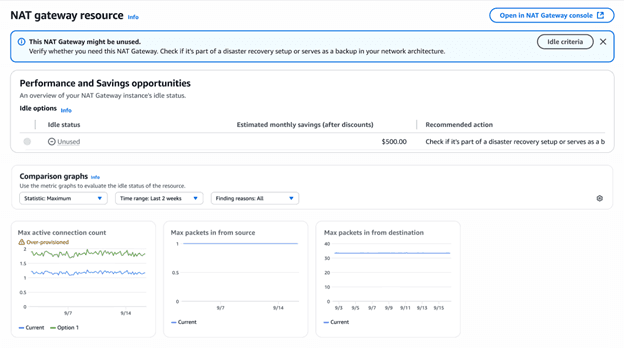
AWS uses a 32-day analysis window to evaluate whether a NAT Gateway is truly unused. It examines the following CloudWatch metrics:
1. ActiveConnectionCount = 0
No active TCP/UDP connections passing through the NAT Gateway.
2. PacketsInFromSource = 0
No inbound packets from resources in your VPC.
3. PacketsInFromDestination = 0
No return traffic from external resources.
Architectural Awareness: The Truely Unique Part
Not all zero-traffic NAT Gateways are actually removable.
Some organizations keep NAT Gateways as disaster recovery components, only activated during failover events.
Compute Optimizer checks:
✔ Route table associations
✔ Routing activity
✔ Architectural signals
If a NAT Gateway is associated with any route table—even with zero traffic—it is not automatically recommended for removal, because it may serve as a backup.
This prevents accidental deletion of critical HA networking components.
Important: Manual Verification Is Still Crucial
Some DR architectures update route tables only during failover via automation (e.g., Lambda functions).
Under normal conditions:
- No traffic
- No route table association
- Appears unused
But it may still be needed.
➡️ Always validate recommendations before deletion.
TruCost.Cloud strongly recommends tagging backup infrastructure and documenting DR flows to make validation easier.
Where to See Unused NAT Gateway Recommendations
After enabling Compute Optimizer (free for basic idle checks), unused NAT Gateway recommendations show up within 24 hours.
You can access insights via:
✔ Compute Optimizer Console
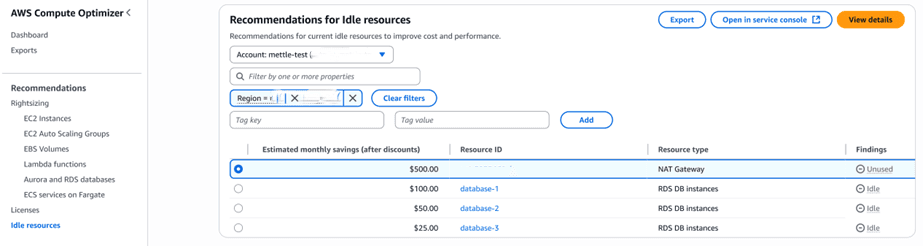
Navigate to Dashboard → Idle resources
See all unused NAT Gateways with:
- Monthly savings estimate
- Traffic graphs
- Metric history
- Resource metadata
- Associated VPC/subnets
- Tags
✔ Programmatic Access via API
The GetIdleRecommendations API now includes NAT Gateway support.
✔ AWS Cost Optimization Hub (Highly Recommended)
Here, NAT Gateway recommendations appear alongside:
- Rightsizing recommendations
- Commitment (SP/RI) recommendations
- Idle resource cleanup opportunities
- Waste identification
The Hub also deduplicates savings to prevent double-counting, offering a realistic overview of cost-cut potential.
How TruCost.Cloud Helps You Go Beyond Basic Recommendations
AWS gives you insights.
We help you implement, automate, and maintain optimization at scale.
TruCost.Cloud provides:
✔ Automated unused NAT Gateway cleanup workflows
Avoid manual review by applying rules like:
- Remove only if zero-traffic AND zero route-table associations
- Validate with Slack/Teams approval
- Enforce tagging rules before deletion
✔ DR-Safe Network Optimization Blueprint
We ensure your failover architecture remains intact while removing unnecessary spending.
✔ FinOps dashboarding for NAT Gateway cost trends
✔ Continuous monitoring + automated alerts
Get notified instantly when NAT Gateway waste reappears.
Top Benefits of This New Capability
1. Immediate Cost Savings
Unused NAT Gateways typically cost hundreds to thousands per year across environments.
2. Smarter Network Hygiene
Improve your VPC networking structure without breaking DR setups.
3. Clearer Visibility
Consolidated view of idle resources in a single dashboard.
4. Zero Operational Risk
Architectural context reduces false positives.
5. Seamless Integration with Cost Optimization Hub
Centralized FinOps workflow for your entire AWS footprint.
How to Get Started (Step-by-Step)
Step 1: Enable AWS Compute Optimizer
Go to Compute Optimizer → Get started
Enable for your AWS Organization.
Step 2: Wait 24 hours
AWS collects 32 days of data but begins showing preliminary results within a day.
Step 3: Open “Idle Resources” Dashboard
Check the NAT Gateway entries.
Step 4: Validate Recommendations
Look at traffic graphs and route-table mappings.
Step 5: Take Action
Remove or repurpose unused NAT Gateways.
Step 6: Automate Using TruCost.Cloud
We help you ensure no cost leakages recur.
FAQs About AWS Compute Optimizer Now Detects Unused NAT Gateways
1. What is an unused NAT Gateway in AWS?
A NAT Gateway is considered unused when it has zero traffic and zero active connections over a 32-day analysis window.
2. How does AWS Compute Optimizer identify unused NAT Gateways?
It evaluates three CloudWatch metrics—ActiveConnectionCount, PacketsInFromSource, and PacketsInFromDestination—and checks for associated route tables.
3. Can I delete a NAT Gateway that has zero traffic?
Not always. It may be part of a DR or failover architecture. Always validate before deleting.
4. Does this feature cost extra?
No. Idle resource detection is part of Compute Optimizer’s free tier.
5. How much can I save by removing unused NAT Gateways?
Savings vary by region but typically $32+ per month per NAT Gateway, excluding data processing fees.
6. Are NAT Gateway recommendations available in Cost Optimization Hub?
Yes. You can view them alongside other optimization opportunities.
7. How does TruCost.Cloud enhance NAT Gateway cost optimization?
We add automation, validation workflows, DR-safe cleanup rules, and ongoing FinOps governance.
8. Can I get recommendations through API?
Yes, via the GetIdleRecommendations API.
9. What if the NAT Gateway is part of a failover pattern?
Compute Optimizer attempts to detect this using route-table checks, but manual verification is always recommended.
10. How often are recommendations updated?
Continuously, based on the latest CloudWatch data.
Final Thoughts
The ability to identify unused NAT Gateways is a huge step forward for automated FinOps.
AWS Compute Optimizer now gives you complete visibility across compute, storage, database, and networking waste.
With TruCost.Cloud’s automation and cost governance, you can eliminate unnecessary NAT Gateway costs without risking high availability or DR readiness.