AWS has once again expanded its cost-optimization ecosystem—this time targeting one of the most consistently expensive layers of any cloud architecture: databases.
With the launch of AWS Database Savings Plans, customers can now reduce database costs by up to 35% while maintaining complete deployment flexibility across database engines, Regions, and instance/serverless types.
This groundbreaking pricing model brings the power of traditional Compute Savings Plans to AWS managed database services, giving FinOps practitioners and engineering teams a unified way to optimize persistent data workloads—without losing the freedom to modernize or migrate.
In this blog, we break down everything you need to know about Database Savings Plans, how they work, how to choose the right commitment, and how TruCost.Cloud helps organizations maximize savings, improve coverage, and eliminate cost risks.
What Are Database Savings Plans?
Database Savings Plans allow AWS customers to commit to a fixed hourly usage amount (measured in $/hour) for 1 year, in exchange for discounted rates on eligible database services.
The discount automatically applies every hour to any matching database usage across:
✔ AWS Database Engines
- Amazon Aurora
- Amazon RDS (MySQL, PostgreSQL, MariaDB, SQL Server, Oracle)
- Amazon DynamoDB
- Amazon ElastiCache
- Amazon DocumentDB
- Amazon Neptune
- Amazon Keyspaces
- Amazon Timestream
- AWS Database Migration Service (DMS)
✔ Deployment Types
- Serverless databases
- Provisioned DB instances
- On-demand throughput
- Provisioned capacity (DynamoDB, Keyspaces)
✔ Regions
Database Savings Plans are available in all AWS Regions except China. They allow your commitment to apply globally across Regions, giving you more flexibility and predictable database costs.
This is a huge win, especially for companies scaling globally or migrating workloads across environments.
How Much Can You Save? (Real Discount Ranges)
Deployment Model | Discount Offered |
Serverless databases (Aurora, DynamoDB, Timestream, etc.) | Up to 35% |
Provisioned instances | Up to 20% |
DynamoDB & Keyspaces On-Demand Throughput | Up to 18% |
DynamoDB/Keyspaces Provisioned Capacity | Up to 12% |
Serverless offers the deepest discount—making it even more attractive as companies adopt variable and AI-driven workloads.
Why AWS Introduced Database Savings Plans
Modern organizations operate heterogeneous data ecosystems:
- Relational + NoSQL mixed workloads
- Migration from legacy engines to modern ones
- Serverless adoption
- Multi-Region architectures
- AI-driven, high-variability traffic patterns
Traditional RIs or single-engine commitments lacked flexibility.
AWS Database Savings Plans solve that by enabling flexibility + predictable spend.
You can:
✔ Switch from provisioned to serverless
✔ Migrate from RDS MySQL to Aurora PostgreSQL
✔ Shift workloads between Regions
✔ Expand globally without losing discount
All while maintaining the same single commitment amount.
How Database Savings Plans Work
You commit to an hourly database spend, for example:
- $10/hour
- Over 1 year
Every hour, AWS checks your eligible database usage and applies the Savings Plan against the bill.
If usage ≤ your commitment → all gets discounted
If usage > your commitment → extra billed at on-demand rates
This structure rewards:
- Predictable workloads
- Always-on databases
- Migration programs
- Hybrid serverless + provisioned setups
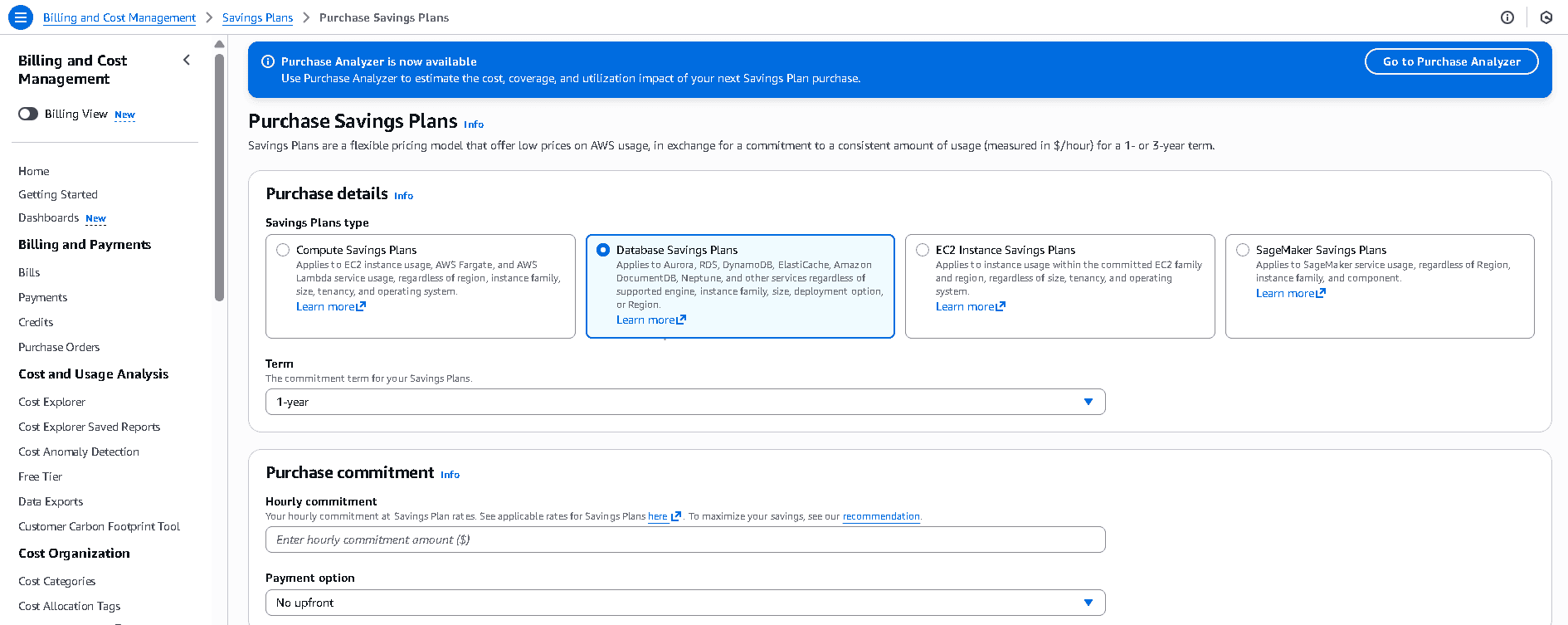
How to Purchase Database Savings Plans (Step-by-Step)
AWS offers two primary paths to evaluate and purchase Database Savings Plans:
1. Savings Plans Recommendations
Best for:
✔ Stable workloads
✔ Quick purchasing decisions
✔ Cost optimization teams with predictable usage patterns
Where to find:
AWS Console → Billing → Savings Plans → Recommendations
Select: Database Savings Plans
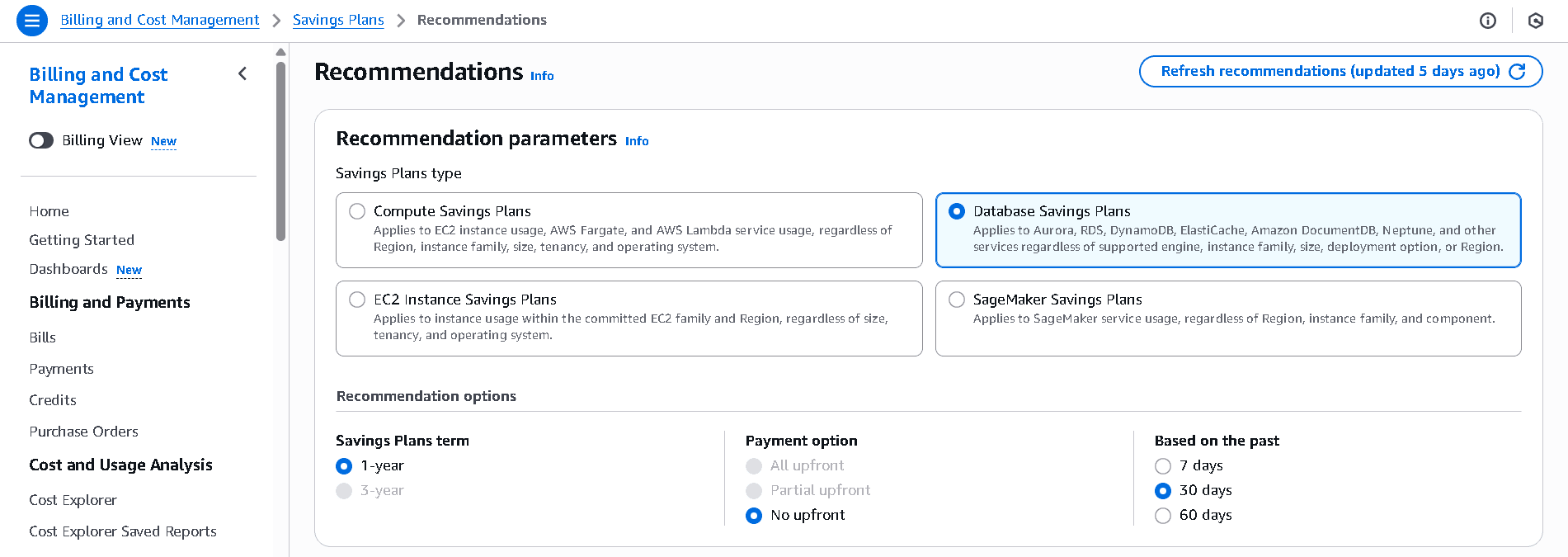
What AWS automatically analyzes:
- Recent on-demand usage
- Ideal hourly commitment
- Estimated monthly savings
- Projected coverage
- Utilization percentage
When to use it:
- You want a fast, data-backed recommendation
- You buy Savings Plans quarterly or yearly
- Your workload does not change heavily
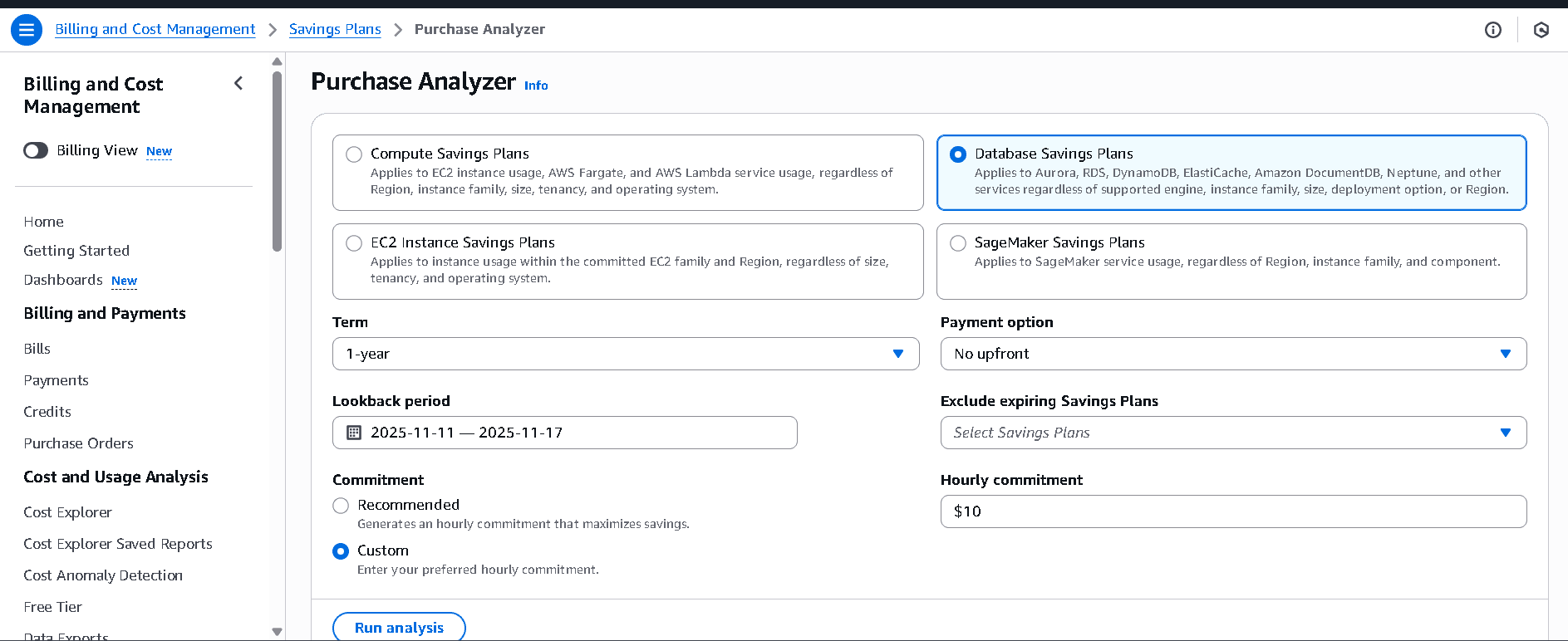
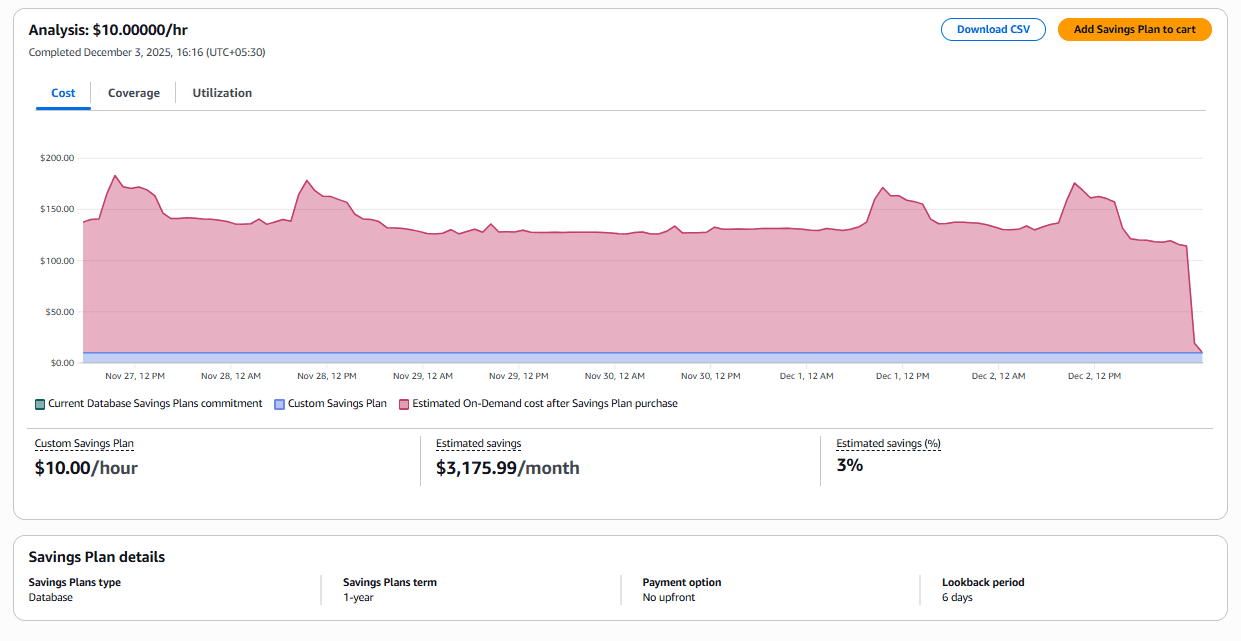
2.Purchase Analyzer (Advanced Modeling Tool)
Best for:
✔ Dynamic workloads
✔ Incremental purchase strategies
✔ Companies expecting growth or database migrations
✔ FinOps teams wanting deep control
What you can customize:
- Hourly commitment
- Lookback period
- Growth assumptions
- Payment options
- Future workload changes
When to use it:
- You’re planning a migration (e.g., RDS → Aurora)
- You want to simulate multiple commitment levels
- You want to avoid over-purchasing
- You follow an incremental FinOps strategy
Why the Purchase Analyzer Is Preferred for FinOps
This tool is ideal for:
- Phase-wise commitments
- Uncertain usage patterns
- Organizations planning future expansions
- Workloads that grow over time
It helps you precisely model the impact on cost, utilization, and coverage before buying.
After Choosing a Commitment
Whether using Recommendations or Purchase Analyzer:
1. Click Add to Cart
2. Review real-time discount projections
3. Adjust settings if needed
4. Proceed to purchase
Discounts apply immediately after purchase.
Best Practices for Database Savings Plans (from TruCost.Cloud)
As FinOps specialists, we recommend:
1. Start with 40–60% of the recommended commitment
This protects you from future usage spikes.
2. Use a blended view of serverless + provisioned workloads
Because serverless gets up to 35% discount.
3. Re-evaluate every quarter
Coverage gaps and utilization trends shift as your architecture evolves.
4. Track commitment utilization with Budgets or Cost Explorer
Unused commitment = wasted money.
5. Combine Compute + Database Savings Plans
For holistic coverage across application + data layers.
How TruCost.Cloud Helps You Maximize Savings
At TruCost.Cloud, we provide end-to-end FinOps services built around cost visibility, optimization, and governance:
✔ Automated Savings Plan Sizing
Custom algorithms analyze demand patterns using Athena, QuickSight, and Cost Explorer.
✔ Migration-aware Purchasing Strategy
We model how database engine changes affect your discounts.
✔ Weekly Savings Plan Efficiency Reports
Coverage, utilization, leakage, and cost anomalies.
✔ Alerts for Commitment Gaps
Never miss an opportunity to buy or adjust.
✔ Real-time multi-account analysis
Perfect for large organizations using AWS Organizations.
With Database Savings Plans now available, we help customers design the right commitment strategy, avoid over-purchasing, and maximize savings without risk.
FAQs –AWS Database Savings Plans
1. Are Database Savings Plans the same as RDS Reserved Instances?
No. RDS RIs are engine-specific and Region-specific.
Database Savings Plans give broad flexibility across engines, types, and Regions.
2. What is the minimum commitment?
There is no minimum. You can commit as little as $0.10/hour.
3. Do Savings Plans apply to Multi-AZ RDS or Aurora clusters?
Yes—eligible database usage is automatically discounted.
4. Are Database Savings Plans available for a 3-year term?
Currently No. Only a 1-year term is available as of launch.
5. Do Savings Plans cover storage costs?
No. They apply to compute and throughput usage, not storage.
6. Can I combine Compute Savings Plans with Database Savings Plans?
Yes. They operate independently and complement each other.
7. How do I track utilization and coverage?
Use:
- Cost Explorer
- AWS Budgets
- AWS Savings Plans Utilization Reports
- Athena + QuickSight dashboards
8. Will Savings Plans apply during database migrations?
Yes. They apply even if you switch engines or deployment types mid-migration.
Conclusion: The Future of Database Cost Optimization Starts Here
Database Savings Plans mark a major shift in how AWS customers can optimize database workloads.
With up to 35% in savings, cross-Region flexibility, and freedom to migrate or modernize workloads without penalty, this model is a game-changer for:
- FinOps teams
- Cloud architects
- Data engineering teams
- Enterprise cost managers
At TruCost.Cloud, we help organizations strategically purchase and manage these Savings Plans to ensure optimized spending, maximum coverage, and zero waste.
If you’re ready to bring predictability and efficiency to your AWS database strategy, Database Savings Plans are the new standard.